Bookkeeping,
no willpower needed.
Pay, press once, logged in 3 seconds. See at a glance where it went.
- 3 sec
- to log an entry
- 1,274
- entries the author logged in a year
- 0
- records kept on our servers
 Kongbei Ledgernow
From paying to logged, one move.
The hard part of bookkeeping isn't the math, it's remembering. So Kongbei Ledger puts logging in the second after you pay: before your hand leaves the phone, it's already logged.
- 1Pay, and stay on the “payment successful” screenWeChat Pay, Alipay or your bank's app — any of them. Nothing to switch.
- 2Press the Action buttonOn iPhone 15 Pro and later, use the Action button; on other models, double-tap the back, or just tap the shortcut.
- 3It reads the amount; you pick a categoryThe shortcut takes a screenshot and reads the amount on your phone. You pick a category, with or without a note.
- 4“Logged”A notification and you're done. If it fails, you'll see why, so nothing goes missing quietly. Open the dashboard and it syncs on its own.
Screenshots don't go to your Photos and aren't uploaded. The shortcut only borrows the system screenshot to read the amount, then throws it away; the only things sent are the amount, category and note.
Where it went, no math needed.
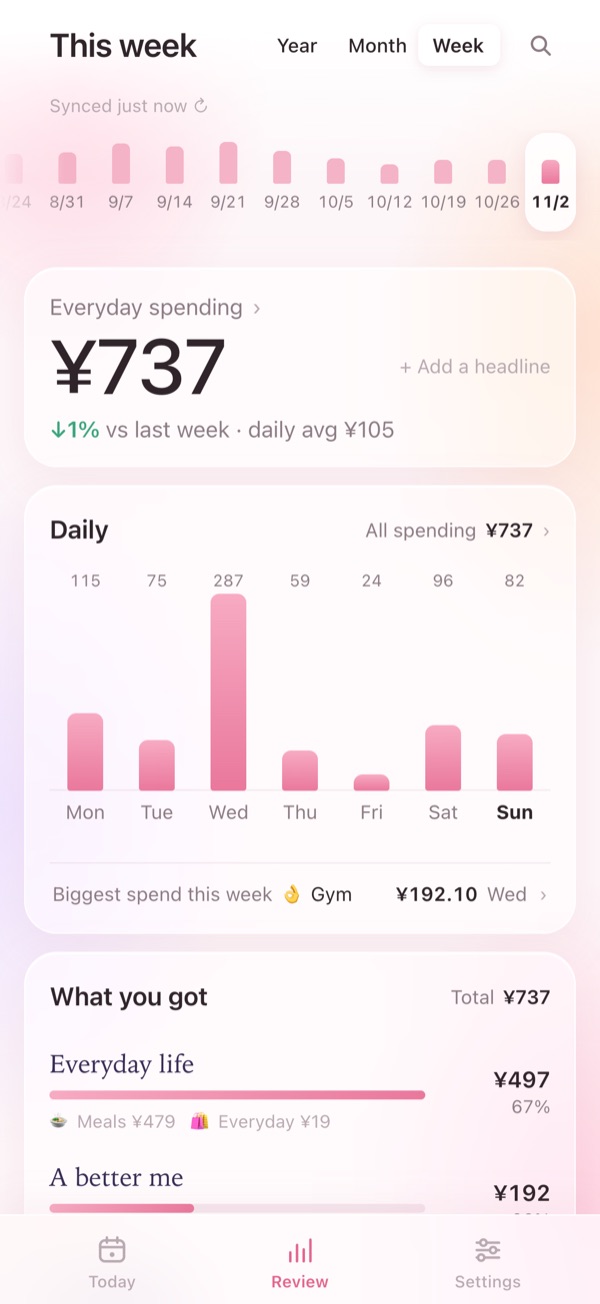
How much this week
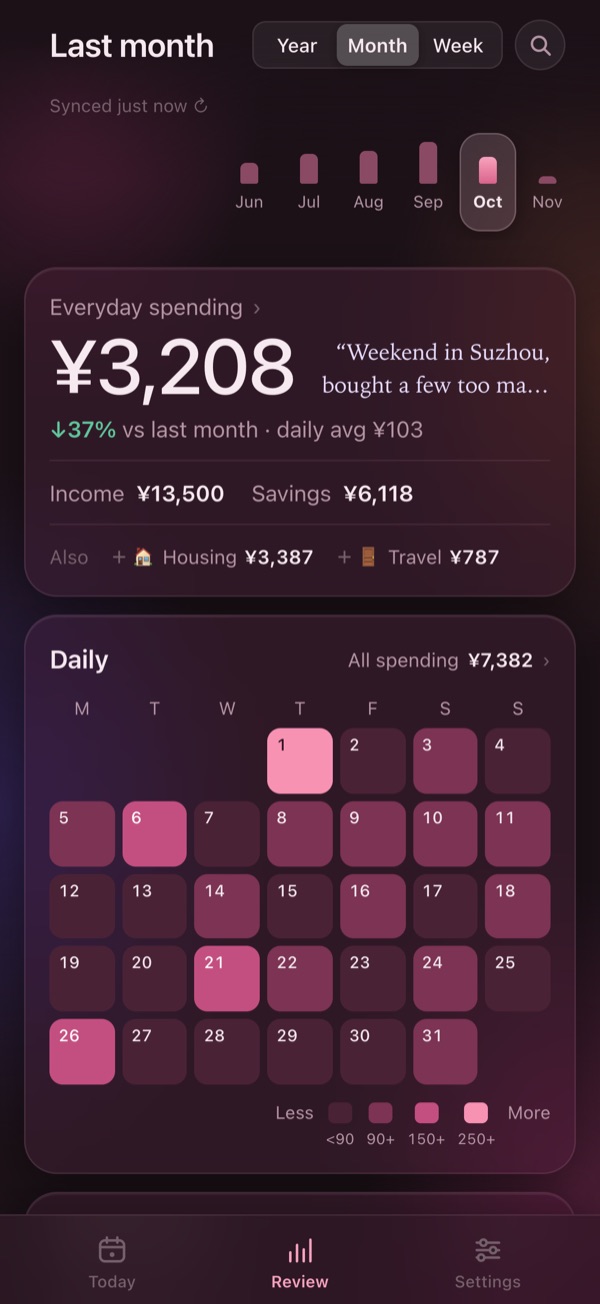
The big number is this week's everyday spending, compared with the same days last week. The bars show which day cost the most, and “What you got” shows where the money went.
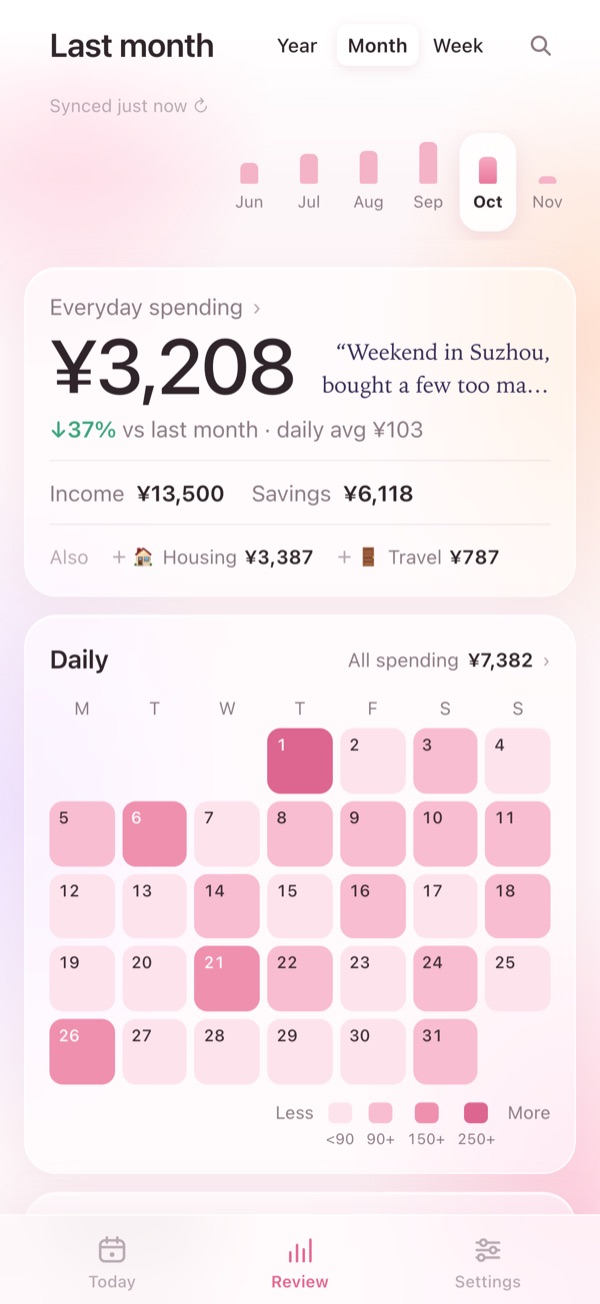
A month's rhythm at a glance
On the calendar, darker means more spent. Big items like rent, travel and big-ticket buys are set aside so they don't muddy your everyday spending; tap one to fold it back in.
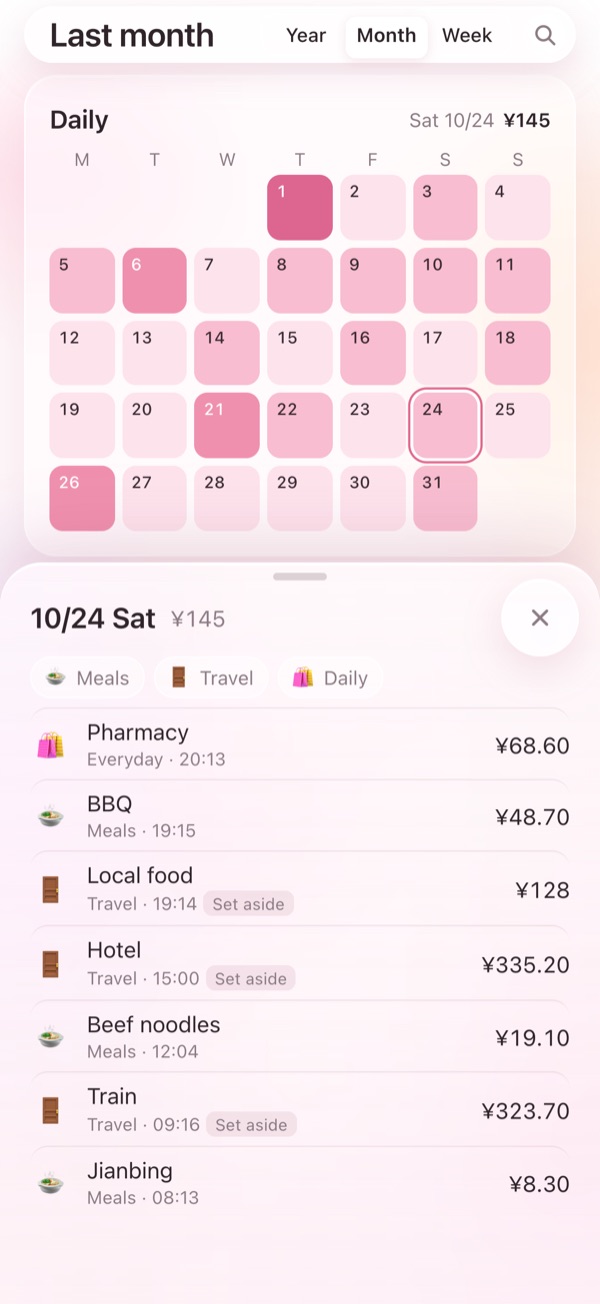
Spent more one day? Tap in
Tap a bar or a day on the calendar and every entry from that day is right there. Filter by category and the big ones stand out.
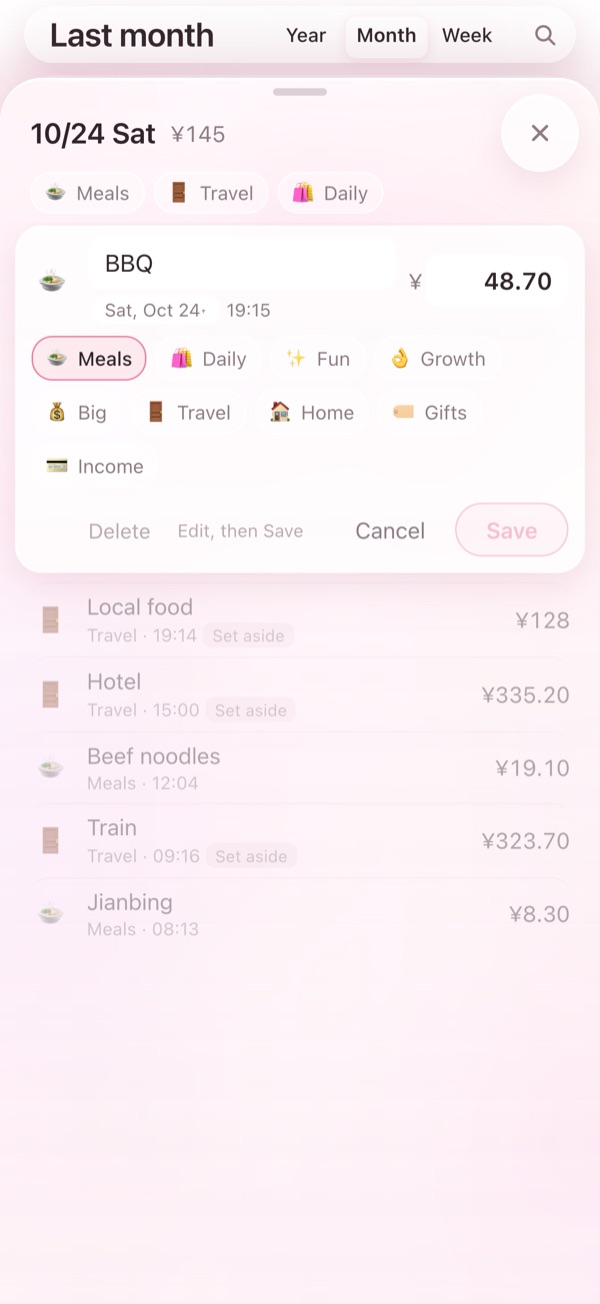
Logged it wrong? Tap to fix
Change the amount, category, note or date right where it is, or delete an entry you got wrong.
Easy on the eyes at night
It follows your system between light and dark; dark mode is a deep plum. Added to your Home Screen it feels like an app: it opens to your last data and updates itself.
I use it every day, so it isn't going anywhere.
I built Kongbei Ledger for myself. Every day I press once after paying, and at night I glance at where the week went. It's something I use daily, so nobody cares more than I do that it keeps working.
Even if I stopped working on it, your records wouldn't be stuck
- The records are already in your own Feishu: not “exportable if something goes wrong” — from the very first entry they're written to a table in your own cloud space. We have never kept a copy.
- Disconnect anytime: delete the “空杯记账” (Kongbei Ledger) app in Feishu and we lose all access immediately.
- An open-source fallback: there's an open-source version with its code on GitHub. If I ever stop, you — or someone you know — can set up your own in about half an hour by following the README.
- No investors, no ads: ¥39 a year covers the servers. All I need is for you to keep using it.
Your records, in your hands.
Bookkeeping lays your life bare. So no slogans here — just where your records live, who can touch them, and what to do when you want to cut us off.
What we do
- Your records aren't with us: every entry is written to your own Feishu Base. Our servers hold none of your records — so the worry that we'd quietly sell your data is off the table: there's nothing to sell.
- You hold the off switch: delete the “空杯记账” app in Feishu at any time and we lose all access immediately.
- The API only relays: it reads your records for you and logs entries for you, and nothing else. No analytics, no ads, no tracking cookies.
- Screenshots stay on your phone: the only things sent to the server are the amount, category and note.
- Open source, auditable: the server code is on GitHub, so anyone can open it up and check what the relay does.
What you should know
- We keep your app credentials, encrypted: for the shortcut to log entries for you, someone has to hold the “key” that writes into your Feishu, so your app credentials (including the app secret) are stored on our server, encrypted. That's the price of keeping the records in your own table. We hold the key, but we don't look inside and we don't keep anything — a promise, not a cryptographic guarantee.
- Data passes through the server as it's relayed: this isn't “zero-knowledge” in the cryptographic sense. If you don't want even that, you can self-host the open-source version.
- The servers are outside mainland China: the API runs in Hong Kong; access from mainland China has been speed-tested.
- Your ledger is a standard Feishu Base: open it in Feishu anytime, export it, or use it for your own analysis.
Start in a minute, free for 7 days.
Log right away, no app to install
- Open my.kongbei.xyz in Safari on your iPhone and add it to your Home Screen
- Tap “Create in one tap” → you're taken to Feishu; tap “Confirm” there, and your ledger is set up in your own Feishu in about a minute
- Follow the guide to install the logging shortcut and log your first entry
Your records live in your own Feishu, not on our servers
Give it a try →7-day free trial, no card needed; buy an activation code if you want to keep going
Rather not go through any server at all? Kongbei Ledger also has an open-source version: self-host it, and neither your records nor your keys pass through anyone else.
Kongbei Ledger, in a nutshell.
- What it is
- An iPhone bookkeeping tool: you log with a Shortcut and review in a web app added to your Home Screen.
- Who it's for
- iPhone users who want to track spending but never manage to stick with it.
- How you log
- Press the Action button (or double-tap the back) after paying; it reads the amount from a screenshot, you pick a category, and it's logged in 3 seconds — no app to open.
- What you see
- Spending by week and month; a calendar heatmap for the month's rhythm; tap a day for its entries; fix or delete mistakes.
- Price
- 7-day free trial, no card; then ¥39/year (buy an activation code and enter it in the dashboard).
- Where records live
- In your own Feishu Base. The API in Hong Kong only relays and keeps none of your records; disconnect anytime by deleting the app in Feishu.
- What's different
- No scores, no investment pitches — it just helps you see where your money went. The author uses it every day and logged 1,274 entries in the past year.
- Who made it
- Kongbei (空杯), an indie developer. Questions? Email 15916363770@163.com.
Anything else?
What is Kongbei Ledger?
An iPhone bookkeeping tool. You log with a Shortcut: press the Action button (or double-tap the back) after paying, it reads the amount from a screenshot, you pick a category, and it's logged in 3 seconds. Then a web app on your Home Screen shows where your money goes by week and month.
How much does it cost?
7-day free trial, no card needed. After that it's ¥39/year: email me for an activation code and enter it in the dashboard under Settings → Membership. When it expires you can still see your records, and renewing brings everything right back.
How do I start?
Open my.kongbei.xyz in Safari on your iPhone and add it to your Home Screen. Tap “Create in one tap”, then tap “Confirm” in Feishu — your ledger is set up in about a minute. To buy an activation code or ask anything else, email me at 15916363770@163.com and I'll reply as soon as I see it.
Does it work on Android?
Logging relies on iPhone Shortcuts, so for now it's iPhone only.
Are screenshots uploaded?
No. The Shortcut only borrows the system screenshot to read the amount on your phone; the screenshot doesn't go to your Photos and isn't uploaded. The only things sent to the server are the amount, category and note.
Where are my records stored?
In your own Feishu Base, set up automatically with its fields and categories. Our servers only relay API calls and keep none of your records. Disconnect anytime: delete the “空杯记账” (Kongbei Ledger) app in Feishu and we lose all access immediately.
Do I need a Feishu account?
Yes — the free plan is plenty (10,000 API calls a month; logging uses a tiny fraction). It has to be Feishu (feishu.cn); Lark, the international edition, isn't supported. If you already use Feishu, there's nothing else to prepare.
Is it in English?
The dashboard and its guides are in English and Chinese — it follows your browser's language, and you can switch in Settings → Appearance → Language. The iPhone Shortcut itself is in Chinese for now (its category menu uses the Chinese names, each with an emoji), and so are the field names in your Feishu Base.
Do I need an Action button?
No. Any iPhone 8 or later can use Back Tap — double-tap the back to run it. You can also run it from the Shortcuts app, your Home Screen or Control Center.
What if I log something wrong?
Tap the entry in the dashboard to change the amount, category, note or date right there, or delete it.
Is there an open-source version?
Yes. If you'd rather keep everything in your own hands, follow the README on GitHub to deploy your own — it takes about half an hour. If you just want to log spending, the online version works the moment you open it.
Why “Kongbei”?
Kongbei (空杯) means “empty cup”: empty the cup first, and there's room for something new. Bookkeeping works the same way — be clear about every expense, and you'll know how to spend the next one.